
Semrush SEO Writing Assistant vs. Natiad: AI Tool vs. AI Powered Autopilot
Semrush SEO Writing Assistant vs. Natiad: Which is better? Learn if you need an AI tool to assist writers or an AI-powered autopilot to automate SEO content.
What is the Semrush SEO Writing Assistant?
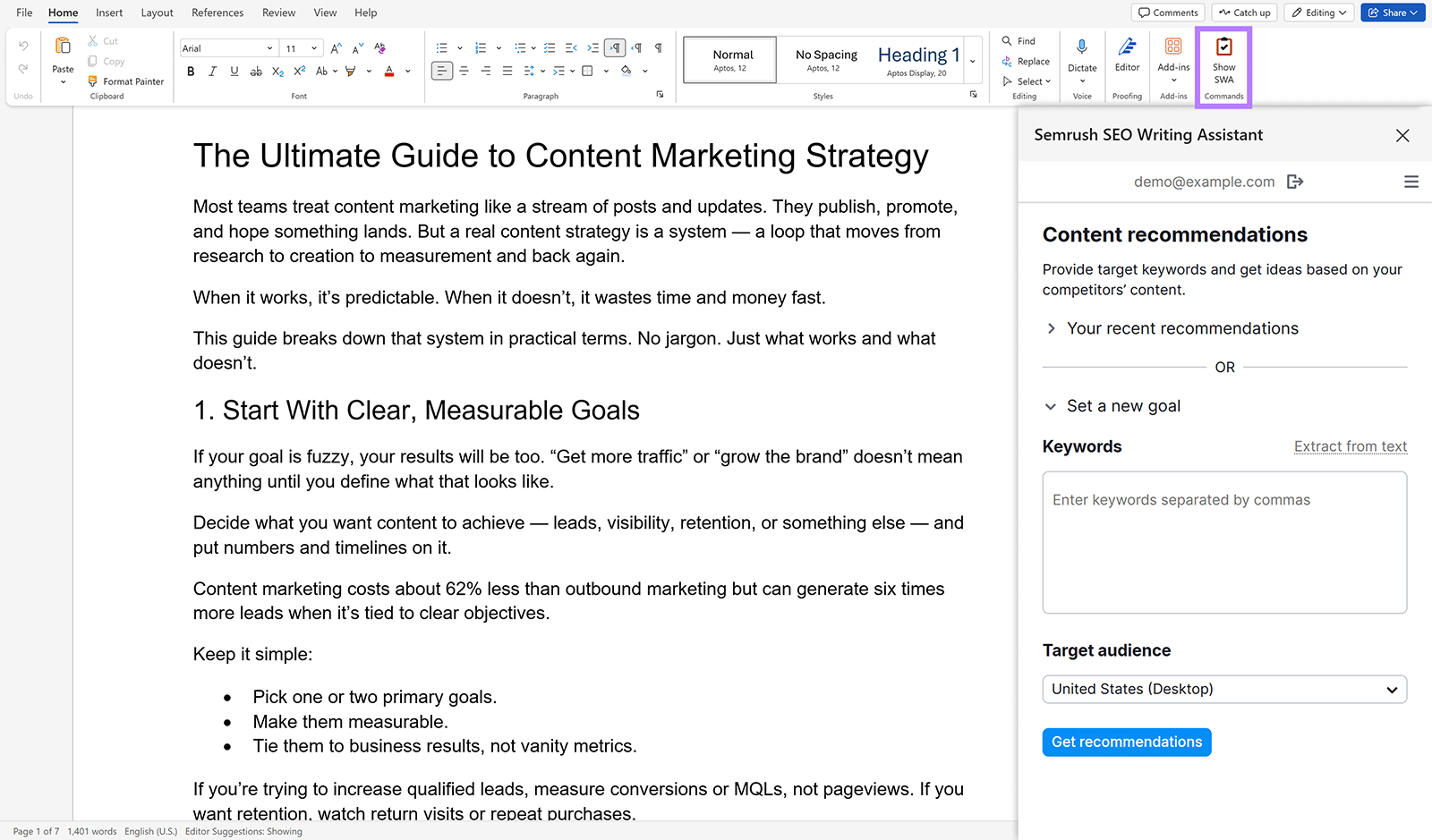
The Semrush SEO Writing Assistant (SWA) is a smart editor tool that provides real-time, data-driven recommendations to help writers optimize content for search engines and user engagement. It functions as an add-on for popular writing platforms like Google Docs, WordPress, and Microsoft Word, analyzing a document against the top 10 ranking competitors for a given set of target keywords.
The core concept behind the SWA is to bring crucial SEO data directly into the writing environment, closing the gap between content creation and optimization. Instead of a writer drafting an article and then handing it off to an SEO specialist for a separate optimization pass, the tool acts as a live coach.
It scores the content across four key dimensions—SEO, Readability, Tone of Voice, and Originality—and offers actionable tips to improve each one. These suggestions are not based on generic best practices but on a competitive analysis of what is currently performing well in the SERPs for the specific keywords you're targeting. For example, it doesn't just tell you to "use keywords"; it recommends specific semantically related terms that the top-ranking articles use. It’s a powerful tool designed to augment and guide the manual writing process, not replace the writer.
Core Features & Benefits
The SWA evaluates your content against several key metrics, providing a comprehensive score and specific, actionable feedback to improve your work.
- Overall Score: At a glance, you see a score out of 10. This number represents the overall quality and optimization level of your text based on all the factors below. It's a quick benchmark to understand where your content stands.
- SEO Recommendations: The tool analyzes your content against top-ranking rivals and suggests semantically related keywords to include. This helps you build topical relevance and avoid keyword stuffing, ensuring your content covers the topic comprehensively.
- Readability Analysis: Using the Flesch-Kincaid scale, the SWA assesses how easy your text is to read. It highlights overly long sentences and complex words, helping you simplify your language to match your target audience's reading level.
- Tone of Voice Consistency: You can set a target tone (e.g., casual, neutral, or formal). The assistant then flags sentences that deviate from this target, helping you maintain a consistent brand voice throughout your article.
- Originality & Plagiarism Checker: An integrated plagiarism checker scans your text against a vast database of web content. This is invaluable for ensuring your content is unique and for verifying the originality of work from freelance writers.
- AI Rephraser: To help overcome writer's block or improve clarity, you can highlight a sentence and use the built-in AI to generate alternative phrasing options.
Source: Semrush
How to Use the Semrush SWA (Step-by-Step Tutorial)
Getting started with the Semrush SEO Writing Assistant involves a few simple steps to integrate it into your existing writing process. Here's a typical workflow for using it in Google Docs.
Step 1: Installation and Setup
- Open a Google Doc.
- Go to
Extensions>Add-ons>Get add-ons. - Search for "Semrush SEO Writing Assistant" and install it.
- You'll need to grant it permission to access your Google account.
- Once installed, open it by going to
Extensions>Semrush SEO Writing Assistant>Show.
Step 2: Connect Your Semrush Account and Set Targets
- The SWA sidebar will prompt you to log in to your Semrush account. You must have a paid subscription with access for it to work.
- Once logged in, click the
Get recommendationsbutton. - A pop-up will ask for your target keywords. Enter one or more keywords you want the article to rank for, select your target country and device, and click
Get recommendations.
Step 3: Analyze the Real-Time Feedback The SWA will analyze the top 10 ranking pages for your keywords and generate a set of recommendations, displayed in the sidebar with its four key metrics and an overall score.
Step 4: Iteratively Optimize Your Content Your workflow now becomes a loop of writing and refining:
- Write a paragraph: Focus on creating valuable content for the reader.
- Check the SEO tab: See if you can naturally weave in any of the recommended keywords. For example, if you've written about "email marketing," SWA might suggest adding "newsletter templates" or "automation workflows."
- Check the Readability tab: If a sentence is flagged as hard to read, try breaking it into two shorter sentences or replacing complex words with simpler alternatives.
- Review and Repeat: As you make changes, the scores will update in real-time. Continue this process to improve your score, aiming for a significant increase while ensuring the text remains natural and valuable for a human reader.
Platform Integrations: Where Can You Use It?
The SWA's strength lies in its ability to integrate directly into where you already work.
- Google Docs: Ideal for collaborative environments where writers, editors, and SEOs all need to access the same document.
- WordPress: The WordPress plugin is invaluable for last-minute checks and optimizations directly within the CMS before hitting "Publish." It works with both the Gutenberg Block Editor and the Classic Editor.
- Microsoft Word: An MS Word add-in provides the same functionality for teams that use a Microsoft-centric document workflow.
- Semrush Interface: You can also use the tool directly within the Semrush platform's "SEO Content Template" and "On Page SEO Checker," but the third-party integrations are what make it a true "assistant."
Source: Semrush
Semrush SEO Writing Assistant Pricing: Is It Free?
No, the Semrush SEO Writing Assistant is not free for any practical or ongoing use. While a free Semrush account may let you try it once, full functionality is tied to its paid subscription tiers.
The price of the SWA is bundled with a full Semrush subscription and is not sold as a standalone product. Meaningful access generally requires one of the higher-tier plans:
- Guru Plan: Around $250 per month.
- Business Plan: Around $500 per month.
This pricing model makes it a significant investment, primarily suited for businesses already committed to the broader Semrush ecosystem for their SEO and marketing needs.
Pros and Cons of Using the SWA
The right choice depends on your team's workflow, budget, and content goals.
Semrush SEO Writing Assistant: Pros
- Seamless Integration: It meets writers where they are, integrating beautifully into Google Docs, WordPress, and Word.
- Excellent for Training: Provides fantastic real-time feedback for training junior writers and enforcing on-page SEO best practices.
- Data-Backed: Leverages Semrush's robust SERP analysis data, making its recommendations reliable.
- Meticulous Optimization: Very helpful for perfecting high-value "money pages" or pillar content where every detail matters.
Semrush SEO Writing Assistant: Cons
- Prohibitive Cost: Being locked behind expensive Semrush plans makes it an inaccessible add-on for many individuals and small businesses.
- Encourages "Writing for the Tool": Writers can become overly focused on hitting a high score, which can sometimes lead to unnatural text.
- Strategically Blind: The tool has zero strategic capability. It only optimizes the content it's given, regardless of whether that content is right for your business goals.
- Does Not Scale Production: It helps improve a single article but does not help you produce more content faster.
Top Alternatives to the Semrush SEO Writing Assistant
Alternatives to SWA fall into two distinct categories: other on-page "assistants" that perform a similar function, or full "autopilot" platforms that offer a different approach to content creation.
Direct Competitors: On-Page Writing Assistants
The best alternatives provide similar real-time SEO feedback, often with a more focused feature set or at a more accessible price point. Top competitors include Surfer SEO and NeuronWriter. Both are market leaders in content optimization, operating similarly to SWA by scoring your draft against top competitors and offering NLP-based keyword suggestions. Because this is their core business, their features are often deeper and more refined than SWA, which is just one tool in Semrush's vast suite.
A Different Approach: Full Content Automation with Natiad
The primary alternative to the entire "assistant" category is an AI-powered automation platform that manages the end-to-end content lifecycle. This is where a solution like Natiad sits. Instead of a tool that helps a human write, it's a platform that writes for you as part of a complete, automated strategy.
The core philosophy is to shift the human's role from being "in-the-loop" for every sentence to being "on-the-loop" to manage the overall strategy. Natiad is designed to put a website's entire SEO content strategy on autopilot by handling:
- Strategic Planning: Analyzing your site to identify content gaps and building a full content roadmap organized into logical keyword clusters.
- AI-Powered Execution: Generating complete, SEO-optimized articles at scale for the entire roadmap.
- Automated Publishing & Interlinking: Publishing the content and automatically adding internal links between new and existing articles to build topical authority.
This approach is built for achieving scale and velocity, fundamentally changing the user's role from writer to high-level strategist.
Comparison: Writing Assistant vs. Content Autopilot
The Semrush SWA is a tool for writers to improve single articles, while Natiad is a platform for marketers to automate their entire content strategy.
| Criteria | Semrush SEO Writing Assistant | Natiad (AI Autopilot) |
|---|---|---|
| Primary Function | On-Page Content Optimization Assistant | Automated Content Strategy & Creation |
| Core Workflow | Plugin for manual writing in an external editor | Centralized automation platform |
| Content Generation | Assists with rephrasing existing text | Generates complete, long-form articles from scratch |
| Ideal User | Content writers, editors, on-page SEO specialists | SEO managers, marketing directors, agencies, publishers |
| Key Focus | Improving a single, in-progress document | Scaling an entire content program for topical authority |
| Internal Linking | No capability; checks for broken links only | Fully automated to build content hubs |
Natiad is an AI SEO platform that puts a website's content marketing on autopilot using AI agents. It analyzes a site, creates a content roadmap, writes SEO-optimized articles, and automatically publishes them with internal links to drive traffic and revenue from search engines and AI assistants. Explore more at https://natiad.com.
Frequently Asked Questions (FAQ)
What is the Semrush SEO Writing Assistant plugin?
The Semrush SEO Writing Assistant plugin (or add-on) integrates the tool's functionality directly into your writing environment, such as WordPress or Google Docs. This allows it to provide live feedback on your content without you having to copy and paste text between different applications.
Is Semrush SEO Writing Assistant free?
No, the Semrush SEO Writing Assistant is not free for any meaningful use. Full and ongoing functionality requires a paid Semrush subscription, typically at the Guru or Business tier.
What is a good Semrush SEO score?
A good score in the Writing Assistant is generally one that shows significant improvement after addressing the tool's recommendations. While there's no official target, users often focus on increasing the score substantially from its initial baseline. However, chasing a perfect 10/10 can sometimes lead to unnatural text, so it should be used as a guide, not a rigid rule.
Semrush Writing Assistant vs. Surfer SEO: What's the difference?
Both tools aim to help you optimize content based on SERP competitors. SWA is part of the larger Semrush suite, making it convenient if you're already a subscriber. Surfer SEO is a dedicated content optimization platform and is often considered to have more in-depth features for this specific task, such as more detailed keyword and structural analysis.
Can an AI SEO writing assistant replace a human writer?
An "assistant" like Semrush SWA is designed to augment, not replace, a human writer. However, a full "AI automation platform" like Natiad can handle the entire writing process for many types of informational SEO content, effectively replacing the need for manual article drafting to achieve scale.
The Verdict: Is the Semrush SEO Writing Assistant Worth It?
Choosing the right tool is a strategic decision about where you want to focus your team's energy. Is your goal to help your writers make better articles one by one, or is it to build a content machine that runs itself?
Choose the Semrush SEO Writing Assistant if you are already deeply invested in the Semrush ecosystem with a Guru or Business plan. It's the right fit if your primary bottleneck is ensuring on-page SEO quality for a low volume of manually written articles. It is an investment in perfecting individual assets.
Choose an AI Autopilot like Natiad if your primary objective is to rapidly and massively scale organic traffic through content. It is the definitive choice for teams that need to build topical authority across a wide range of keywords. If you want to move beyond the manual grind and automate the entire content engine—from strategic planning to writing, publishing, and interlinking—then you're not looking for an assistant; you're looking for an AI platform. It is an investment in building a compounding system.