
How the #1 Ranked SEO Article Writers Automate Internal Linking
Top SEO article writers automate internal linking to build authority and save time. Learn their step-by-step workflow, from AI tools to strategic pillar-cluster models.
Internal linking has evolved from a tedious, manual task for an SEO article writer into a strategic, automated process. For decades, SEOs meticulously tracked internal links in spreadsheets, spending countless hours manually searching for opportunities and updating old posts.
Today, the most effective writers no longer just produce text; they orchestrate sophisticated SEO systems where internal linking is a cornerstone for building topical authority and driving rankings. This guide provides a step-by-step process for leveraging internal linking to improve efficiency, construct a powerful site architecture, and boost organic traffic.
Core Principles of a Smart Internal Linking Strategy
Before deploying any tool, you must define the strategic purpose of your links. Automation without strategy is just faster chaos. This begins with a clear understanding of your website's core topics and a solid grasp of how links function.
What Are Internal Links?
Internal links are hyperlinks that connect one page on your website to another page on the same website. They stand in contrast to external links, which point to a page on a different domain. Think of them as the hallways and signposts within your own building, guiding users and search engines from room to room.
Why Internal Linking is a Superpower for SEO
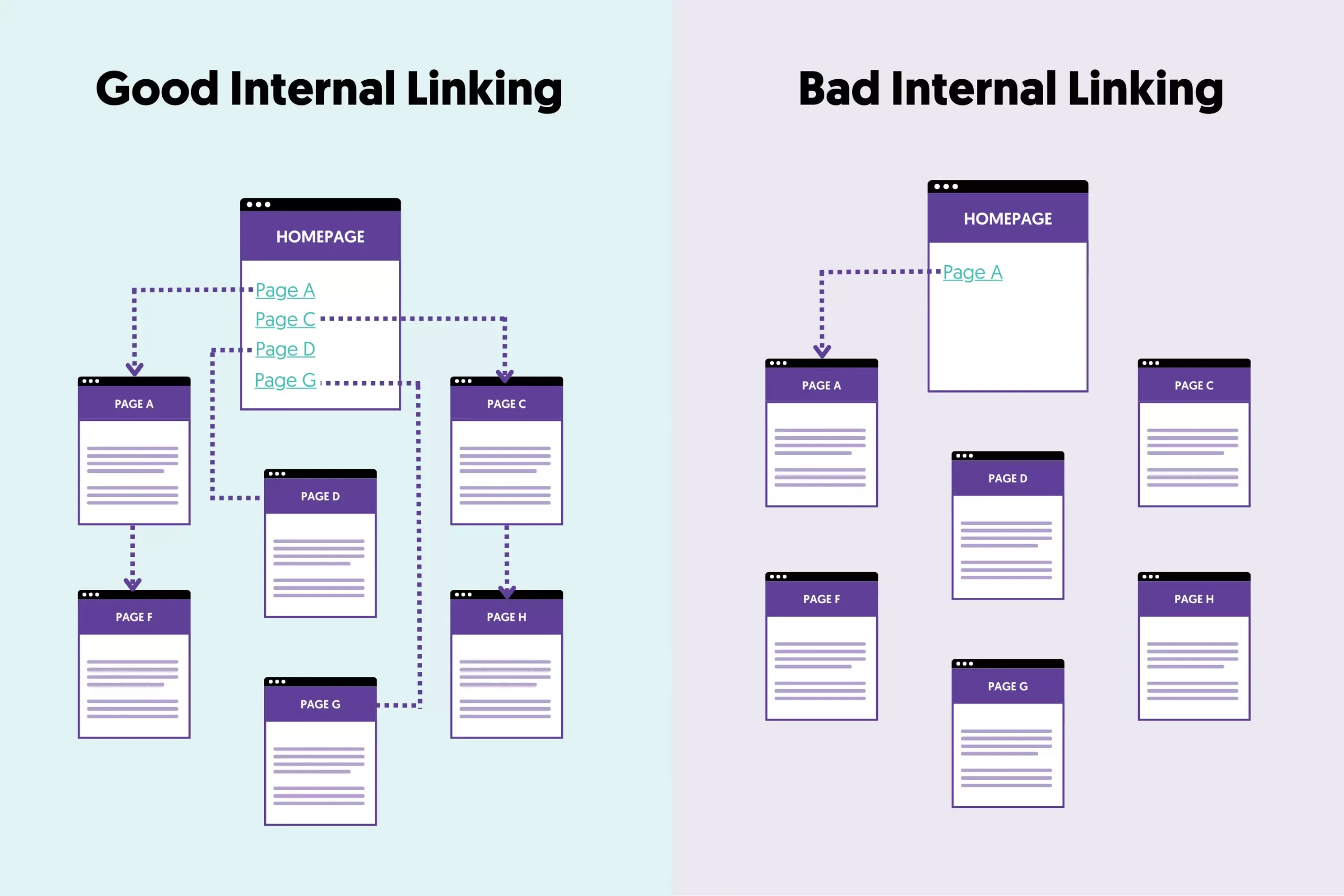
Every internal link serves four primary functions. As Google Search Advocate John Mueller stated, internal linking is "one of the biggest things that you can do on a website to kind of guide Google and guide visitors to the pages that you think are important."
- Distributes Authority (Link Equity): High-authority pages, like your homepage or an article with many backlinks, accumulate "link equity." Internal links pass a portion of this authority to other pages on your site. A strategic link from a powerful page can significantly boost the ranking potential of a newer page.
- Builds Topical Authority: Search engines reward sites with deep expertise on a subject. By creating a dense web of internal links between related articles—a structure known as a topic cluster—you signal that your site is a comprehensive resource, making your content more likely to appear in search results and AI Overviews.
- Improves User Navigation & Engagement: A logical internal linking structure guides visitors to relevant content, encouraging them to explore your site more deeply. This improves key user engagement metrics like time on page and pages per session while actively reducing your bounce rate.
- Enhances Crawlability & Indexing: Search engine bots discover new content by following links. A page with no internal links pointing to it is called an "orphan page" and may never be found or indexed. A well-structured site ensures that crawlers can efficiently find and process all your content.
The Pillar-Cluster Model: Your Strategic Blueprint
Your linking strategy needs a map, and the most effective model is the pillar-cluster. This structure organizes your content in a way that is intuitive for both users and search engines.
- Pillar Pages: These are comprehensive, high-level guides on your core business topics (e.g., "The Ultimate Guide to Customer Relationship Management"). They target broad, high-volume keywords and act as the central authority hub for a given subject.
- Cluster Content: These are more specific articles that explore subtopics related to the pillar in greater detail (e.g., "How to Choose a CRM," "CRM Implementation Best Practices"). They target more specific, long-tail keywords.
Source: reliablesoft.net
The linking structure is simple and powerful:
- Every cluster article links up to the main pillar page.
- The pillar page links out to all its supporting cluster articles.
- Relevant cluster articles also link to each other.
This model creates a clear, hierarchical structure that becomes the perfect blueprint for any internal linking process, whether manual or automated.
A Practical Workflow: How to Find and Add Internal Links
As an SEO article writer, your goal is to efficiently weave new content into your site's existing architecture. Here are three methods, from manual to fully automated.
The Manual Method: Google Search Operators
The simplest way to find linking opportunities is with Google's site: search operator. This is slow but effective for smaller sites.
- Workflow: When writing a new article about "Advanced SEO Techniques," you might want to link to it from existing content.
- Action: Go to Google and search:
site:yourdomain.com "SEO techniques"orsite:yourdomain.com "SEO strategy". This will show you all the pages on your site that mention those phrases, giving you a list of potential pages to edit and add a link from.
The AI-Assisted Method: In-Editor Suggestions
Tools like Link Whisper or the premium version of Yoast SEO bring link discovery directly into your content editor (e.g., WordPress).
- Workflow: As you write your article, the tool scans your content in real-time. It then analyzes your library of published posts and suggests relevant internal links and anchor text in a sidebar.
- Action: You review the list of suggestions and, with a single click, insert the ones that are a good contextual fit. This turns a 15-minute task into a 2-minute one.
The Fully Automated Method: Setting Strategic Rules
For large-scale content operations, a fully automated system executes your pre-defined strategy.
- Workflow: You connect a platform that can analyze your entire site. You then create "if-then" rules based on your pillar-cluster map. For example: "IF a new article is published in the 'Email Marketing' category, THEN automatically find a relevant context in that article to add a link TO the 'Ultimate Guide to Digital Marketing' pillar page."
- Action: The system executes these rules as content is created or published, ensuring a consistent and strategic linking structure without per-article manual review.
Best Practices for Anchor Text Optimization
The anchor text—the visible, clickable text in a hyperlink—tells users and search engines what the destination page is about. Optimizing it is crucial.
- Be Descriptive and Relevant: The anchor text should accurately describe the content of the linked page. Instead of "click here," use "read our guide on technical SEO audits."
- Vary Your Anchor Text: Repeatedly using the exact same keyword-rich anchor text to link to a page can look unnatural. Create variations. For a page on SEO audits, you might use "comprehensive SEO audit," "technical SEO audit services," and "find out what's holding your site back."
- Avoid Generic Phrases: Links like "click here," "read more," or "learn more" provide zero contextual value to search engines and are less compelling for users.
- Keep It Natural and Concise: Anchor text should fit naturally into the flow of the sentence. Aim for a concise phrase rather than an entire sentence.
Using Tools to Automate and Scale Your Internal Linking
Choosing the right technology depends on your scale, budget, and desired level of automation.
Comparing Linking Approaches: Manual vs. AI-Assisted vs. Automated
Understanding the trade-offs is crucial for making the right investment. This isn't just about features; it's about how each approach impacts your entire content workflow.
| Feature/Task | Manual Linking | AI-Assisted Linking (e.g., Link Whisper, Yoast) | Fully Automated Linking (Platform-level) |
|---|---|---|---|
| Opportunity Identification | Writer uses Google searches or memory. Slow and inconsistent. | Tool provides a list of link suggestions within the editor as you write. | AI scans the entire content library and maps all semantic relationships. |
| Anchor Text Selection | Writer's best judgment. Often repetitive. | Suggests anchor text based on the target page's title or main keywords. | Generates diverse, context-aware anchor text variations using NLP. |
| Placement Speed | Slow. 15-30 minutes per article. | Semi-fast. Review a list and click to insert, taking 2-5 minutes. | Instantaneous. Links are placed based on pre-defined rules. |
| Scalability | Very low. A major bottleneck for content velocity. | Medium. Scales better but still requires a human to open every article. | High. Scales effortlessly, whether you publish 10 or 1,000 articles. |
| Retro-linking (Old to New) | Extremely difficult and tedious. | Possible but requires opening each old post to find suggestions. | Automatic. When a new article is published, the platform can add links from relevant old posts. |
Key Features to Look for in an Internal Linking Tool
A robust tool provides a dashboard with actionable analytics that act as a health check for your site architecture.
- Orphan Page Report: Identifies all published pages with zero incoming internal links. These are invisible to both users and search engines.
- Link Distribution Count: Shows the number of internal links pointing to and from each post. This helps you spot imbalances and ensure your most important pages get the most links.
- Broken Link Checker: Periodically crawls your site to find internal links that point to a 404 error page, allowing you to quickly fix them.
Common Internal Linking Mistakes to Avoid
Even with the best tools, a poor strategy can undermine your efforts. Avoid these common pitfalls:
- Over-Optimized Anchor Text: Using the same exact-match keyword for every link to a specific page is a red flag. Diversify your anchor text to keep it natural.
- Creating Orphan Pages: Every new article you publish should have at least one internal link pointing to it to ensure it gets discovered and indexed.
- Ignoring Broken Links: A broken internal link creates a dead end for users and wastes link equity. Regularly audit and fix them.
- Linking for SEO Only: Never force a link where it doesn't make sense. The primary goal is to provide value to the user. If a link feels out of place, it probably is.
- Forgetting Your Money Pages: It's easy to link between blog posts, but don't forget to send authority to your critical service pages, product pages, and contact forms.
Auditing and Refining Your Strategy Over Time
Internal linking isn't a "set it and forget it" task. Use data to validate your strategy and find new opportunities.
Use Google Search Console to Validate Priorities
Google Search Console (GSC) is your direct line of sight into how Google perceives your site.
- Navigate to the "Links" report in your GSC property.
- Under the "Internal links" section, click "More" to see the full list of "Top linked pages."
This report shows you which of your pages have the most internal links. This list should be a direct reflection of your strategy.
If your core service pages and pillar content are at the top, your strategy is working. If not, you need to adjust your rules to build more links to your business-critical URLs.
Automate Link Building to Underperforming Pages
One of the most powerful strategies is to find "striking distance" opportunities.
- Identify Targets: Use GSC or a tool like Ahrefs to find pages ranking on the bottom of page one or the top of page two (positions 5-20). These pages just need a small authority boost.
- Create a Campaign: Use your tool to find high-authority, topically relevant pages on your site and set up a rule to automatically add new internal links to the underperforming page. This targeted injection of link equity is often enough to push it into the top positions.
Natiad is an AI SEO platform that puts a website's content marketing on autopilot using AI agents. It analyzes a site, creates a content roadmap, writes SEO-optimized articles, and automatically publishes them with internal links to drive traffic and revenue from search engines and AI assistants. Explore more at https://natiad.com.
FAQs about Internal Linking for SEO Content
Can an AI SEO article writer completely replace a human for internal linking?
An AI writer replaces the manual, time-consuming tasks of finding and placing links, but it cannot replace human strategy. The best approach uses AI to execute a well-defined strategy, with a human providing final quality control and strategic direction. Automation handles the "how," but the strategist must define the "why."
How many internal links should be in a 1,500-word article?
A good guideline is to include 3-8 internal links per 1,000 words, so a 1,500-word article would have between 5 and 12 contextually relevant internal links. However, quality and relevance are far more important than quantity.
A powerful AI tool will prioritize the most impactful links rather than simply hitting a numerical target. The goal is to help the user, not to hit a quota.
How do AI internal linking tools handle anchor text diversity?
Advanced AI tools use Natural Language Processing (NLP) to avoid over-optimization. Instead of just matching keywords, they can understand the surrounding context and select the most appropriate anchor text from a list of variations you provide. This ensures your link profile looks natural to both users and search engines.
What is the best free tool for internal linking?
While many free AI writers exist, they typically lack the site-wide analysis needed for strategic internal linking. Google Search Console is the best free tool for auditing your links. For actively building links, specialized premium plugins like Link Whisper or all-in-one AI SEO platforms are a more effective investment.
Will Google penalize me for using an automated internal linking tool?
No, Google will not penalize you for using tools to manage your internal links, as its crawlers only see the final HTML code. The risk lies not in automation itself, but in a poorly configured strategy.
If you set rules that result in irrelevant links or keyword-stuffed anchor text, that could be problematic. A well-configured system that helps the user will only enhance your site's performance.